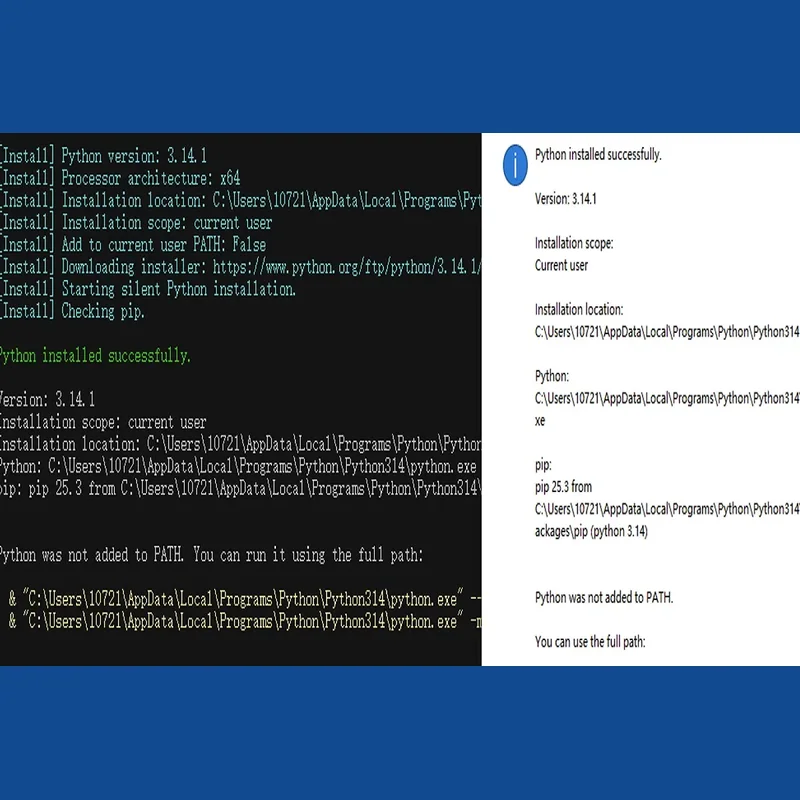
This package delivers a self-running Python installer for Windows that sets up your environment automatically. It lets you customise the Python version, install path and PATH configuration, and comes with a full PDF guide plus a video walkthrough.
- Basic: automated installation script and a detailed PDF guide with step-by-step instructions and screenshots, 1 revision
- Standard: everything in Basic, plus a step-by-step MP4 video of around 4 minutes for newcomers, covering package contents, a run-through of the PDF guide, running the script and confirming a successful install, 2 revisions
One-click Python setup for Windows
This is a ready-made automation package that installs Python on a Windows machine without manual configuration. Formerly offered as a Basic tier at 15 dollars and a Standard tier at 25 dollars, the package removes the usual friction of PATH errors and version mismatches: you launch the script and it takes care of the rest.
The installer pairs a .bat launcher with a .ps1 automation file. You only need to run the .bat file with administrator rights; it triggers the .ps1 script that performs the actual setup.
Security and openness
Everything is delivered in English, including the code, comments and documentation, and you receive the full source so you can inspect, adapt or reuse it. Python itself is fetched straight from the official python.org installer. By default the newest stable release is installed, though you can request any version from 3.8 up to the current stable build, provided it is officially available for your system's architecture.
Package options
Basic covers the automated .bat plus .ps1 script together with a detailed PDF guide containing step-by-step instructions and screenshots.
Standard adds everything from Basic along with an MP4 walkthrough of about 4 minutes, showing the package contents, a tour of the PDF guide, how the script runs and how to confirm the installation worked.
How it operates
Once launched on your Windows machine, the script identifies your system's architecture, fetches the matching Python build and installs it without further input needed. You decide the install folder and whether Python is added to your system PATH, and the script checks the result to confirm the setup succeeded. Supported versions range from 3.8 through to the latest stable release, with the newest version pulled by default unless you specify otherwise.
Who benefits
This suits newcomers to programming who want to avoid installation headaches, anyone who finds a manual Python setup fiddly or slow, and users who simply want a clean, working install without delay.
System requirements
You will need Windows 10 or 11, PowerShell version 5.1 or newer (already present on Windows 10 and 11), and administrator rights to execute the script; architecture detection is handled automatically.
Support after delivery
We provide 7 days of after-sale assistance covering installation and setup problems on a supported Windows system, including script errors, PATH issues, version-detection faults, execution problems and verification failures — resolved or explained at no extra charge if caused by the script. This does not extend to custom code changes, unsupported Windows editions, conflicts with third-party software, manual script edits, or issues stemming from pre-existing Python installations set up by others. The script can spot existing Python installs in typical locations but will not remove, clean or repair them, and it may miss installs placed in unusual or unknown folders. For conflicts caused by prior Python setups we can offer general advice, though fixing third-party configurations sits outside the free support. Support runs through order messages, with replies generally within 24 hours.
Turnaround
The script and PDF guide are delivered within 1 day; the video tutorial is included as part of the Standard package.
This offering is built for a single Windows machine — deployment across multiple computers or organisation-wide rollout is not part of either package.
What happens after you buy
Your order opens its own thread here the moment it is paid, and everything about that
order - questions, changes and the final report - happens in it.